HOME
LINKS
UOP
Ten Mile CC
Madras CC
IDANG
BSDG
Code Camp
ElegantCode
ARTISTS
NERGON
Caricature-Lady
FAMILY LINKS
FLY LADY
ALL RECIPES
PBS KIDS
Disney
DisneyLand
DisneyWorld

|
|
 
Programming / Software Development
Windows Programming Tips
Windows Explorer Command Line Parameters:
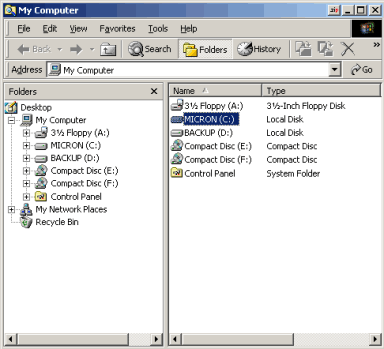
To have Windows Explorer open without expanding any drives, use the following command line for the shortcut:
%SystemRoot%\explorer.exe /n, /e, /select, c:\
Example of launched program using these parameters...
Windows Explorer Command-Line Options:
Explorer [/n] [/e] [(,)/root,<object>] [/select,<object>]
/n
Opens a new single-pane window for the default selection.
This is usually the root of the drive Windows is installed on.
If the window is already open, a duplicate opens.
/e
Opens Windows Explorer in its default view.
/root,<object>
Opens a window view of the specified object.
/select,<object>
Opens a window view with the specified folder, file or application selected.
Examples:
Example 1:
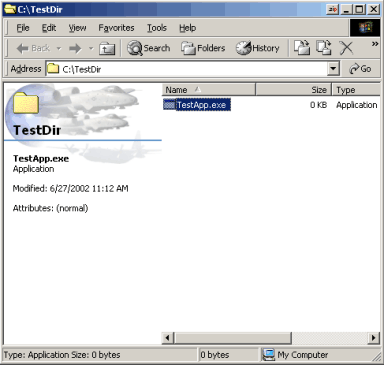
Explorer /select, C:\TestDir\TestApp.exe
Opens a window view with TestApp Selected, as shown below...
Example 2:
Explorer /e, /root, C:\TestDir\TestApp.exe
This opens Explorer with C: expanded and TestApp selected.
Example 3:
Explorer /root, \\TestSvr\TestShare
Opens a window view of the specified share
Example 4:
Explorer /root, \\TestSvr\TestShare, /select,TestApp.exe
Opens a window view of the specified share with TestApp selected.
MSExplorer.exe Shortcut Parameters I Use:
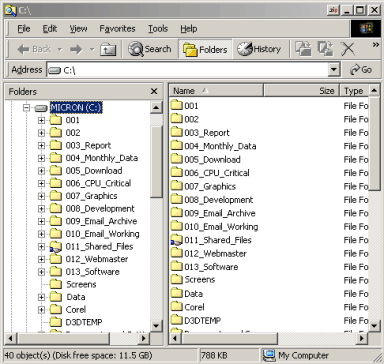
%SystemRoot%\explorer.exe /e, C:\
This will open Windows Explorer in folder view and with C: drive open...
Resources for this subject on the internet:
Change the Windows Explorer Web View Background:
If you use Windows Explorer in Web View format, you can change the background that is displayed. Just find this file on your system:
"C:\Windows\Web\Wvleft.bmp"
Make sure you save a copy of this file before you make any changes to it! You can edit or recreate this file in a graphics
editor to display a picture you prefer. Remember to try and keep the same dimensions as the original Windows file. A 200 X 110 pixel
graphic should work well. Save the graphic to the same directory as the original file, and in BMP format.
Example of a custom Explorer Background...
Here is the graphic I made (shown above), and my original Win2000 graphic:
Force An MS Internet Explorer Shortcut To Open Its Own Window Rather Than Take Over Another:
You may have noticed when opening an MSIE shortcut to a web address, the application will take over another internet explorer window
(if there is one open already) rather than open its own window.
This can be an annoyance to many users that may utilize multiple connections at once or on a continual basis. - Especially if one
requires a logoff, and the other connection boots you out and takes over.
I have done some extensive research and experimentation with this problem, and have finally come up with a way to make MSIE open a
target in its own window (rather than taking over another window that may already be open).
In order to make this work for you, you must recreate your shortcuts to the target addresses. When creating the shortcut,
you must use the following syntax:
Shortcut target string:
"C:\Program Files\Internet Explorer\IEXPLORE.EXE" -new "http://www.chamberlainstudios.net"
Notice the syntax... It must include the path to the internet explorer application on your local machine, then it must include the "-new"
command switch (this is what forces MSIE to open its own window rather than use another instance that is already open), then the internet address.
Be aware that you may copy and paste these target strings into your new shortcuts (include all quotes too), but you may have to change the
first part if your internet explorer application is not located in the same place on your PC.
Alphabetize MS Internet Explorer's Favorites Listing:
Follow These Steps:
- Right-click an area of the Favorites List
- A menu will appear
- Select the option labeled "Sort By Name"
- From then on, all entries in the Favorites listing will be ordered - and you may finally be able to find what you're looking for! Yeah!
Automatically Lauch an Application When Windows Boots Up:
Use One Of The Following Options:
- Place a shortcut to the application in the following location:
C:\Windows\Start Menu\Programs\Startup\
- Add an entry in the Windows Registry at the following location:
[HKEY_LOCAL_MACHINE\SOFTWARE\Microsoft\Windows ...
\CurrentVersion\Run]
Example entry: (Replace "scannerapp" and path)
"Scannerapp"="C:\\program files\\HpScanjet\\ ...
Scannerwarmup.exe"
- Add an entry to the WIN.INI file:
Under the [Windows] section, add a "load=" command.
Example:
load="C:\yourapp.exe"
Unlock Screensaver Properties When a Network Has Locked Them Down:
To Regain Control of the OS's Screensaver Properties:
- Open the Windows Registry and navigate to the following location:
HKEY_CURRENT_USER
Software
Policies
Microsoft
Windows
Control Panel
Desktop
- The following keys will most likely be installed:
ScreenSaveActive
ScreenSaverIsSecure
ScreenSaveTimeOut
Keys are "REG_SZ"
Networks set these keys to 1,1, and 900
- To Regain Complete Control of the Screensaver Properties:
The above listed keys must be completely removed from the Desktop directory.
CorelDraw 9 Application Error Fix
CorelDraw 9 Application errors out opening any application-related file, reporting "Error creating new document"; and PhotoPaint will not open any files,
reporting a 'Must Close Application' error:
This error has occured to me in the past when there is a problem with the default printer availability. For instance,
I have a shared printer on another computer that I use most often for most printing. This error will occur, keeping me
from using my Corel graphics applications at all, when my networked printer is (for some reason) not available. After
going to the trouble of completely reinstalling the Corel Suite applications multiple times with no avail, I have
learned that all I need to do to fix the error is make the local printer (LPT1 - if there is a side-by printer installed on the
machine) the default printer - at least until the other network printer is on line again.
This has been a frustration and major waste of time to figure out. Following Corel's past trends, they do not care
to provide help or patches for their non-latest versions - but will, of course, always continue to sell them on the shelf.
Corel's support service has always been a thorn in the side. A customer can never get any free support for the product
they bought from this company. I should charge them for all the time I've wasted troubleshooting this problem.
I'm sure there are many other users out there who have wasted time on the same error.
Oh, excuse me. I forgot about the 30 day free technical support. How could I have forgotten
about that? Probably because no-one ever needs support in 30 days, unless they can't get the software installed at all.
People don't find the real problems until they've used it for a while.
As soon as someone else builds a decent (I say "decent" because that's all Corel is) graphics suite, I will be one of
the first to dump Corel in the trash - just because their support policy has cost me more money and time than they will
ever be able to repay me for these ridiculous little gliches that take five minutes to re-program and post a patch for.
I.E: If the printer is unavailable, how about displaying a message that says so? That takes less than a couple of minutes
to program in any language. They are lazy. They have no concept of support - supporting the very product they
take money for selling. What programmer in their right mind bases the entire operation of a desktop application
on whether or not the Windows Default printer happens to be available? Hello? Isn't there some universal, common-sense
law that says you have to own some logic before you are allowed to write it for other people? Let the user create their work of art!
THEN worry about whether or not they can print it! Heck, maybe I'll be the first to build a new graphics suite for the world to use. Don't worry,
I'll post fixes! They'll probably be worse problems, but heaven help me, I'll post fixes! - Don't hold your breath for it though. I have kids to raise first. :T
|
|